
The short answer: WATransExt WhatsApp Web Translate is a desktop Chrome extension that can detect and translate incoming messages inside WhatsApp Web. You can write a reply in your own language, translate it into the customer's language, and send it without moving the conversation to another translation website.
This WhatsApp auto-translate workflow covers the whole conversation rather than one isolated sentence:
- Customer messages display with a translation in the same chat.
- You compose replies in the language you know best.
- Original text, translation, and conversation context remain together.
- Each contact or group can keep its own language rules.
WATransExt is designed for WhatsApp Web in desktop Chrome, not for mobile installation. WhatsApp has also rolled out native message translation to supported mobile versions and languages. Availability varies by device and language; this guide focuses on continuous incoming and outgoing translation on desktop WhatsApp Web.
What Does WhatsApp Auto Translate Actually Do?
Translate Incoming Messages Automatically
When a customer writes in Spanish, Portuguese, or another language, WATransExt detects the language and displays a translation near the original message. The original remains visible for checking model numbers, quantities, currencies, and exact wording.
This is more useful for a live inquiry or support thread than a translation copied into a separate page with no context.
Translate and Send Your Reply
Automatic translation should solve both reading and replying. Write in your own language, then choose to translate and send, translate for review, or send the original. Incoming and outgoing translation remain part of one chat workflow.
Keep Separate Settings for Every Conversation
One account may speak with a Brazilian buyer, a Mexican distributor, and an English-speaking supplier on the same day. WATransExt can preserve source language, target language, and translation behavior for individual contacts or groups, instead of forcing one global language on every chat.
Catch Untranslated Messages Before Sending
If a draft is still in your own language, the sending safeguard can interrupt the action and remind you to translate it. This reduces a common mistake, but it does not replace human review of quotations, payment terms, or contracts.
Use Shortcuts and Readable Translation Styles
Configure shortcuts for translate-and-send, translate-only, and direct send. Adjust translation size and color so original and translated text remain easy to distinguish in both light and dark WhatsApp Web themes.
Start WhatsApp Web Auto Translation in Three Steps
1. Install WATransExt
Add the extension to desktop Chrome and open the WhatsApp Web account you already use. There is no new inbox and no chat-history migration.
2. Select Languages, Engine, and Chat Rules
Set default source and target languages, enable incoming and outgoing translation, then create separate settings for important contacts when necessary.
3. Read, Write, Translate, and Send
Read the translated customer message in the conversation, write a reply in your own language, and use a button or shortcut to translate it. Review prices, dates, quantities, and payment conditions before sending.
Visit WATransExt WhatsApp Web Translate to learn how the extension fits into a practical translation workflow.
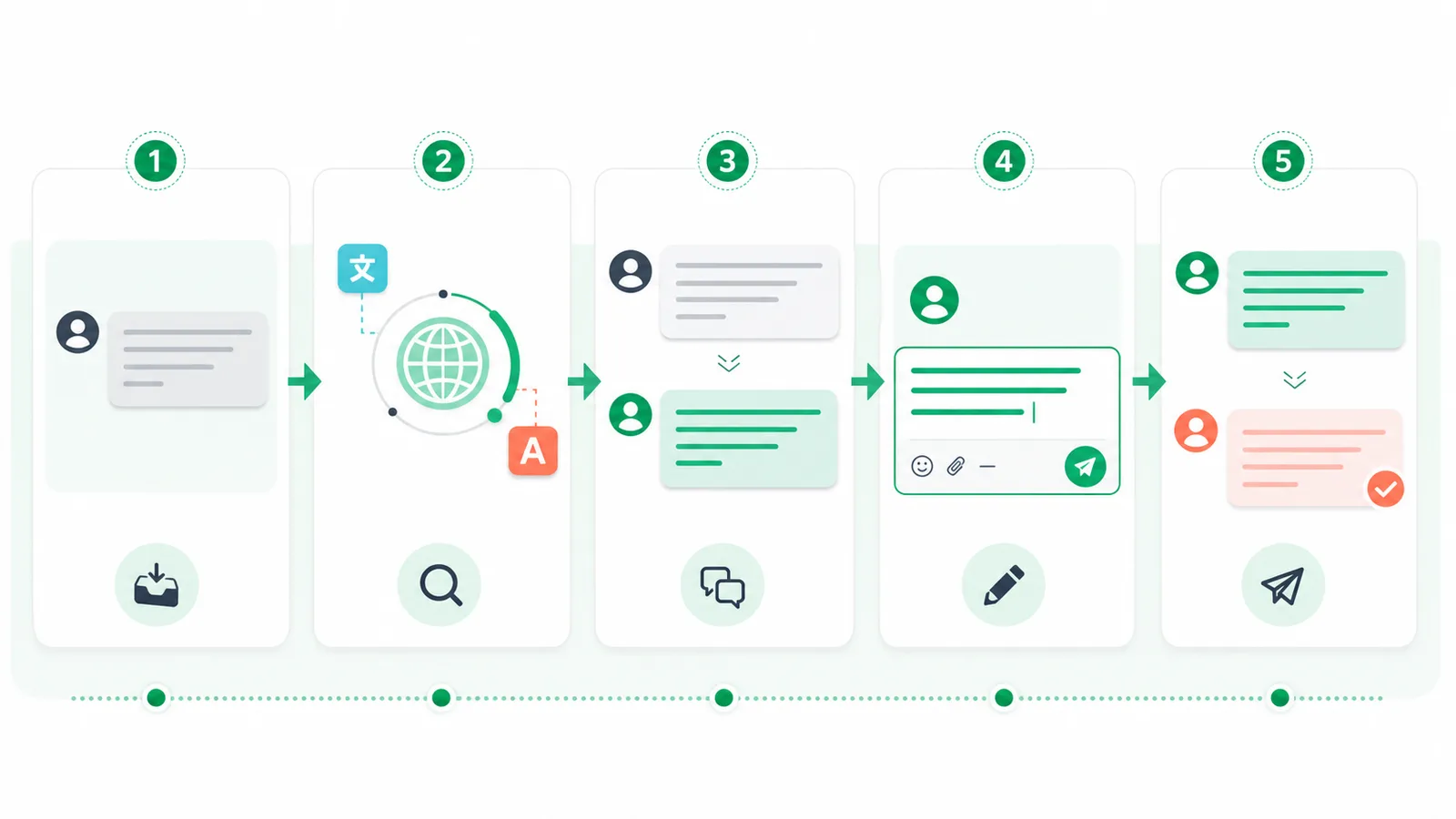
Incoming message, language detection, displayed translation, native-language reply, and translated send action stay in one conversation.
A Real Cross-Border Sales Conversation
A customer in Spain asks for the price of 1,000 units and whether shipping is included. WATransExt detects Spanish and displays an English translation beside the original message, so the sales representative immediately sees the quantity, price question, and shipping condition.
The representative writes: “I can confirm the price today. Shipping is included, and delivery is 20 days after the deposit.” WATransExt produces a Spanish reply. The representative verifies 1,000, shipping, and 20 days, then sends it.
When the customer asks about MOQ, samples, or payment, the same conversation settings remain active. WhatsApp incoming-message translation and outgoing-reply translation continue without another language selection.
Why Copy-and-Paste Translation Breaks at Scale
| Method | Incoming messages | Outgoing replies | Context | High-volume work |
|---|---|---|---|---|
| Copy to a translator | Manual every time | Copy back manually | Frequently interrupted | Poor fit |
| Browser page translation | May translate interface text | Does not manage replies | Limited control | Partial fit |
| WATransExt | Inside the conversation | Translate before sending | Original and translation together | Good fit |
Copying a few messages feels manageable. With many simultaneous customers, it becomes easy to paste into the wrong chat, lose the preceding question, mix quotations and product models, or choose the previous customer's language.
A general page translator does not know which text is an incoming customer message and which text is a draft reply. WATransExt works around the conversation structure itself.
Why Every Customer May Need Different Settings
Latin American customers may use Spanish or Portuguese, European suppliers may use English, and a group can contain several languages. One global target language cannot cover all of these conversations.
Per-chat settings let language rules follow the customer. A Brazil contact can use Portuguese-to-English, a Mexico contact Spanish-to-English, and a supplier English-to-your-language. For groups, observe the actual conversation before choosing automatic detection rather than assuming a language from a participant's country.
Choose the Right Translation Plan
Free: Unlimited Text Translation
Free includes unlimited incoming and outgoing text translation, per-chat settings, shortcuts, translation styles, and the free Volcengine translation engine. It does not include premium engines or voice-message translation.
Pro: More Translation Engines
Pro includes every Free text feature and adds Google and Microsoft translation engines. It suits users who need more choices for language pairs, regional wording, and professional terminology. Voice translation is not included.
Max: Translate Voice Messages
Max includes Pro and adds WhatsApp voice-message translation for sales and support teams that receive spoken feedback or field updates.
Every engine still requires human review for prices, contracts, payment terms, dates, and legal content.
Who Benefits from WhatsApp Auto Translation?
Export Sales and Foreign-Trade SOHO Teams
Handle inquiries, quotations, MOQ, samples, lead times, logistics, and payment questions while buyer interest is still active.
Cross-Border Commerce and Customer Support
Understand order issues, delivery updates, returns, and after-sales feedback, then reply in the customer's language.
Freelancers and Remote Teams
Work with overseas clients, suppliers, and partners without sending every WhatsApp message through another tool.
International Social and Travel Conversations
Follow multilingual personal or group chats while preserving the original message and preparing a clearer reply.
What Should You Still Review?
- Prices, currencies, quantities, and dates.
- Product models, proper nouns, and industry terms.
- Contracts, payments, and legal wording.
- Tone, politeness, and cultural expectations.
- The target language assigned to the current contact.
- The customer's actual question and surrounding context.
Automatic translation reduces repetitive work and waiting time; it does not remove business judgment.
Privacy and Message Processing
WATransExt servers do not store your WhatsApp chat history. Translation requests pass through the API of the translation provider you select, so it would be inaccurate to say that every piece of content stays entirely on the device.
Teams should still follow their own customer-data policy and avoid sending unnecessary sensitive information. WATransExt is an independent browser extension and is not affiliated with, authorized by, endorsed by, or sponsored by WhatsApp or Meta.
Frequently Asked Questions
Can WhatsApp Web translate messages automatically?
WATransExt can automatically translate incoming messages in desktop Chrome and translate replies you compose. WhatsApp also offers native translation in supported mobile versions and languages, but that availability and workflow differ from this desktop extension.
How can incoming WhatsApp messages display in my language?
Install WATransExt, select your target language, and enable incoming-message translation. The translation appears in the current conversation.
Can it translate my reply into the customer's language?
Yes. Write in your own language, then translate for review or translate and send.
Does WATransExt send translations without confirmation?
Buttons, shortcuts, and sending settings control the action. Important business messages should be translated and reviewed before sending.
Can every conversation use a different language?
Yes. Individual contacts and groups can keep separate source, target, and behavior settings.
How many languages are supported?
Coverage depends on the selected engine; the product supports common translation combinations across more than 100 languages.
Which translation engines are available?
All plans include the free Volcengine engine. Pro and Max also include Google and Microsoft engines.
Can it translate WhatsApp voice messages?
Yes, with Max. Free and Pro support text messages only.
Can I install WATransExt on a phone?
No. It is a desktop Chrome extension for WhatsApp Web, not an Android or iPhone app.
Does WATransExt store chat history?
Its servers do not store WhatsApp chat history. Requests are processed through the selected translation provider.
What is the difference between Free, Pro, and Max?
Free provides two-way text translation and a free engine; Pro adds Google and Microsoft; Max adds voice-message translation.
Can machine translation replace human review?
No. It speeds up routine communication, but important commercial and legal information still needs review.
Understand and Reply Without Leaving the Conversation
Customers do not stop waiting while a sales representative copies messages, changes translation websites, or reselects a language. WATransExt brings incoming translation, outgoing reply translation, per-chat settings, and shortcuts into WhatsApp Web so multilingual communication stays continuous.
Use WATransExt WhatsApp Web Translate to leave more time for customers and less for moving messages between tools.