
The short answer: Audio to Text for WhatsApp is a desktop Chrome extension that converts voice messages inside WhatsApp Web into readable text and translates foreign-language transcripts into a language you understand. There is no need to replay the entire recording or move the audio to another tool.
This helps sales and support teams read voice notes when playback is inconvenient, compare original transcripts with translations, and verify quantities, prices, names, dates, and delivery requirements.
The extension is designed for desktop Chrome and WhatsApp Web. Voice-to-text, voice translation, and AI message summaries belong to Max. WhatsApp also provides native transcription in certain mobile versions and languages, but availability and workflow differ. No automatic transcript should be treated as perfectly accurate.
Voice to Text and Voice Translation Are Different
Transcription Solves “I Cannot Hear It Clearly”
Transcription turns the recording into text in the speaker's original language. A Portuguese voice note first becomes Portuguese text. This is useful even when you know the language, because numbers, names, and model codes can be reviewed without replaying the whole recording.
Translation Solves “I Do Not Understand the Language”
Voice translation takes the original-language transcript and converts it into the selected target language. A sales representative can compare the Portuguese transcript with an English translation.
| Function | Input | Output | Main use |
|---|---|---|---|
| Voice playback | Audio | Sound | Listen directly |
| Voice to text | Audio | Original-language text | Read and verify |
| Voice translation | Transcript | Target-language text | Understand another language |
| AI message summary | Recent text messages | Context and action items | Review a conversation |
The AI summary currently uses recent text messages only. It does not read or summarize voice notes or their transcripts.
How Audio to Text for WhatsApp Processes a Voice Note
Start Transcription Beside the Voice Message
The action runs inside the current WhatsApp Web conversation. You do not need to download the audio or upload it to a separate page, and the original recording remains available for checking.
Read the Original-Language Transcript
The transcript appears close to its voice message. Check names, companies, products, and numbers against the business context. If a phrase looks wrong, replay that part or ask the customer to confirm it in writing.
Translate the Transcript
After transcription, convert the result into your target language and compare original and translated text. Incoming and outgoing text translation can then continue in the same conversation.
Recover Context from Recent Text Messages
Max can also summarize recent text messages to identify confirmed decisions and action items. This summary complements the voice transcript but does not include it.
Convert a WhatsApp Voice Note in Three Steps
- Install Audio to Text for WhatsApp in desktop Chrome and open your existing WhatsApp Web account.
- Open the conversation and select a target language. Individual contacts can keep separate translation settings.
- Transcribe, inspect, and translate. Review the original transcript first, then the translation, paying special attention to names, quantities, dates, ports, and model numbers.
Explore Audio to Text for WhatsApp to see how voice transcription, voice translation, and two-way text translation work together.
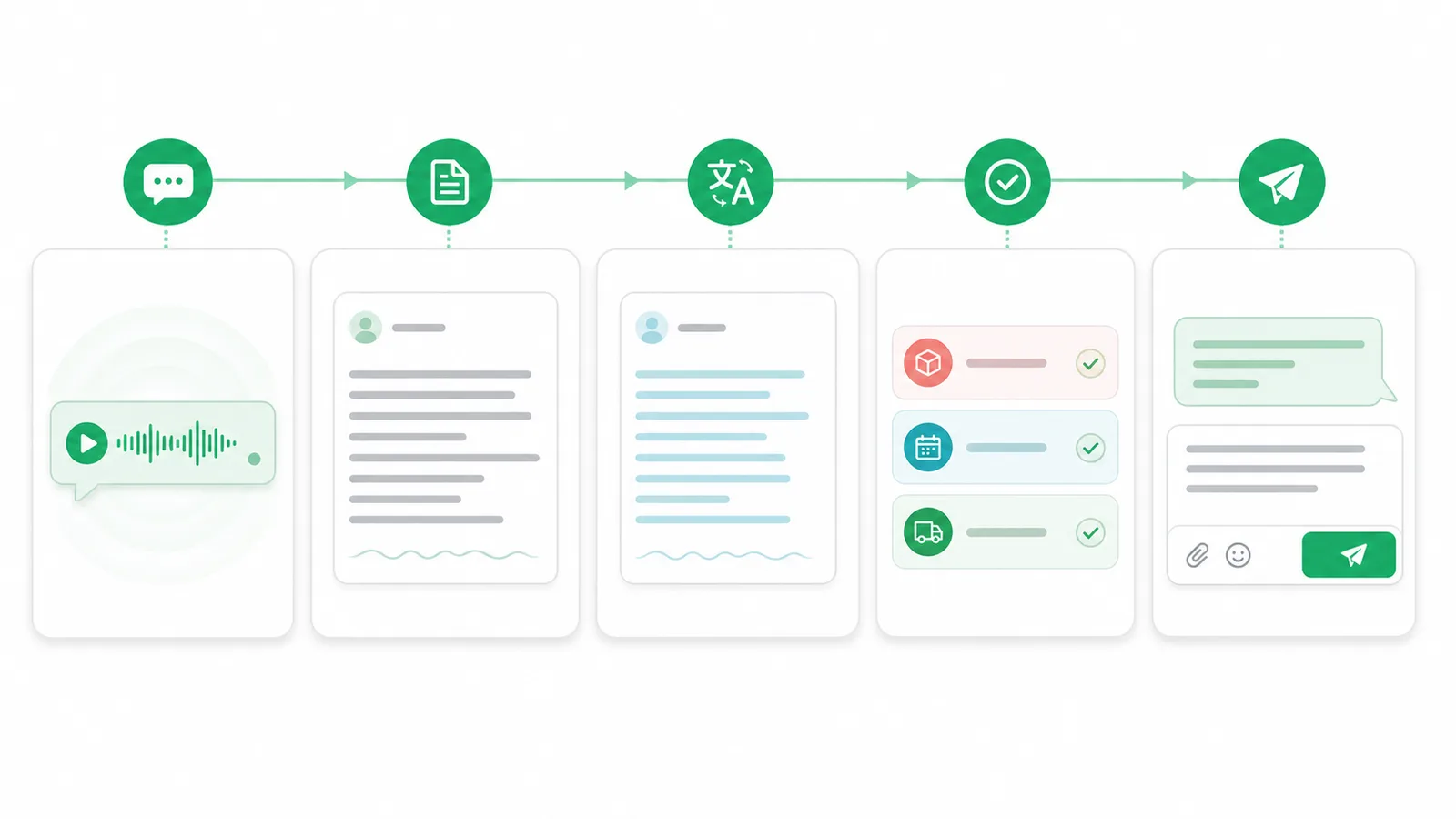
Turn audio into original-language text, translate it, verify important details, and reply to the customer.
How a 47-Second Voice Note Becomes Actionable
A Brazilian buyer sends a 47-second Portuguese voice note. It mentions 1,000 units, delivery before the 18th, freight, and the final delivery date.
With playback alone, the representative must understand Portuguese and remember four separate requirements. Audio to Text for WhatsApp first produces a Portuguese transcript and then an English translation. The representative can review 1,000, the 18th, freight, and lead time separately.
The representative then uses the AI message summary to recover context from recent text messages: the quotation was sent, but production scheduling is still pending. The summary comes from text messages, not the new voice transcript. The representative can now send a translated text reply promising to confirm production, freight, and the final date.
Why Faster Playback Does Not Replace Transcription
| Method | Quiet environment | Foreign language | Numbers and dates | Later review |
|---|---|---|---|---|
| Normal playback | Required | Depends on listening | Easy to miss | Replay needed |
| Faster playback | Required | More difficult | Easier to miss | Replay needed |
| Voice to text | Not required | Original text shown | Review item by item | Read later |
| Transcript plus translation | Not required | Target language shown | Compare both versions | Easier follow-up |
Faster playback helps with a simple message in a familiar language. It does not solve noisy offices, strong accents, long recordings with several requirements, or the need to review a detail hours later.
Who Needs WhatsApp Voice to Text?
- Export sales and foreign-trade SOHO teams: quantities, quotations, MOQ, products, delivery, and payments.
- International customer support: fault descriptions, operating problems, and after-sales feedback.
- Logistics and supplier teams: ports, schedules, tracking information, arrival dates, and exceptions.
- Cross-border commerce operations: order issues, returns, and product feedback.
- Freelancers and remote teams: long voice updates from customers and colleagues.
Why Transcripts Still Need Human Review
- Numbers and dates can be affected by accent and audio quality.
- Names, companies, and model numbers may be unfamiliar to a general speech model.
- Industry terms and abbreviations can sound alike.
- Background noise and overlapping speakers reduce clarity.
- One voice note may mix several languages.
- Payment, contract, and legal information always needs confirmation.
Read the original transcript before relying on the translation. If a key detail is uncertain, replay the recording or request written confirmation.
How AI Message Summaries Fit In
Voice-to-text handles one recording. Voice translation helps you understand it. AI message summaries extract context, decisions, and action items from recent text messages in the current conversation.
The two features complement each other, but their scope is different. The product must not be described as automatically summarizing audio or including voice transcripts in the summary.
Choose a Plan
Free
Unlimited incoming and outgoing text translation, per-chat settings, shortcuts, styles, and the free Volcengine engine. Premium engines, voice-to-text, voice translation, and AI summaries are not included.
Pro
Everything in Free plus Google and Microsoft translation engines. Voice-to-text, voice translation, and AI summaries are not included.
Max
Everything in Pro plus WhatsApp voice-to-text, voice-message translation, and AI summaries of recent text messages.
Privacy and Sensitive Audio
Teams should follow their own and their customers' data-processing policies. Contracts, identity documents, payment information, and personal data require particular care and appropriate authorization.
Without a documented technical basis, the article does not claim that audio is processed entirely on-device or that a server never retains audio. Audio to Text for WhatsApp is an independent browser extension and is not affiliated with, authorized by, endorsed by, or sponsored by WhatsApp or Meta.
Frequently Asked Questions
How do I convert a WhatsApp voice note to text?
Install the extension in desktop Chrome, open WhatsApp Web, and use the transcription action beside a voice message.
Does WhatsApp Web include voice transcription?
Native capabilities vary by platform and version. Audio to Text for WhatsApp provides a dedicated desktop Web workflow.
Does the WhatsApp mobile app offer transcripts?
WhatsApp provides native transcription in supported mobile versions and languages. Availability depends on device, system, and language.
Can it translate a foreign voice note?
Yes. It first generates the original-language transcript and then translates that text into the selected language.
Do Free or Pro include voice to text?
No. Voice-to-text, voice translation, and AI summaries belong to Max.
Does the AI summary include voice notes?
No. It currently summarizes recent text messages only.
Is transcription perfectly accurate?
No. Language, accent, speed, recording quality, and background noise all affect results.
Can I install the extension on a phone?
No. It is for WhatsApp Web in desktop Chrome.
Can I still play the original recording?
Yes. The transcript does not replace the original voice message.
Is this an official WhatsApp extension?
No. It is an independent browser extension with no official WhatsApp or Meta affiliation.
Stop Replaying an Entire Voice Note for One Detail
Quantities, dates, and delivery requirements should not be missed because of language, accent, or playback conditions. Audio to Text for WhatsApp brings transcription, voice translation, two-way text translation, and summaries of recent text messages into WhatsApp Web so teams can turn a voice note into the next action.
Try Audio to Text for WhatsApp to spend more time confirming customer needs and less time replaying the same recording.