
The short answer: with Transhub, a team can create a separate channel instance for every WhatsApp business account, keep several accounts signed in on one computer, and view accounts, customers, and recent conversations from one workspace. There is no need to scan a QR code every morning or maintain a separate browser setup for every number.
This workflow solves four everyday problems:
- Keep multiple business accounts online. Sales, support, and regional accounts can stay signed in without logging out of one account to use another.
- Reduce account mix-ups. Every account has its own login session and site data instead of sharing a browser's default session.
- Make each account's purpose visible. Name instances by country, product line, responsibility, or owner instead of relying on similar phone numbers and avatars.
- Bring the tools together. Account switching, customer messages, real-time translation, and proxy settings live in one desktop workspace.
Transhub provides a multi-account operating environment and customer communication workflow. It is not the official WhatsApp Business API, and it is not presented as an unlimited-account, bulk-messaging, or guaranteed anti-ban solution.
How Transhub Organizes Multiple WhatsApp Accounts
A standard browser opens web pages. Transhub is designed for the ongoing operation of multiple business accounts. Each WhatsApp account has a clear entry point, a separate login state, and language and network settings that can remain associated with its market.
One Account, One Independent Channel Instance
Each WhatsApp business account can sign in through its own Transhub instance. Cookies, Local Storage, IndexedDB, cache, Service Workers, and login state are stored by instance rather than being overwritten when another account signs in.
For example, “Brazil Sales” and “EU Support” can remain available on the same computer. When the workspace is closed and reopened, each persistent instance continues with its saved session. A new QR scan is only needed when WhatsApp itself requests authentication again. Removing an instance explicitly clears the session assigned to that instance.
Keep Several Accounts Online Without Repeated Sign-Outs
The usual workaround is to keep signing out of WhatsApp Web or create a browser profile for every account. As the number grows, the taskbar fills with nearly identical windows and operators lose track of which number they are using.
Transhub brings the instances into one account list. Operators can switch to the required account while its login state and conversation context remain in that instance. This does not bypass WhatsApp device verification or service limits; it reduces the manual sign-outs, overwritten sessions, and repeated setup caused by ordinary browser workflows.
Label Accounts by Market, Function, and Owner
Multi-account management starts with naming. A phone number alone does not reveal which market it serves or who should answer. Clear names might include:
Brazil SalesEU SupportSample LeadsPartner Accounts
Every name should help answer four questions: Which market does this account serve? What work belongs there? Who owns it? Who handles an incident? Consistent labels turn account handovers into a manageable process instead of a test of one employee's memory.
See Accounts and Recent Conversations in One Workspace
When several accounts receive messages, the difficult question is not whether the pages can open. It is which customer should be answered first and from which account. Transhub keeps account entry points and recent conversations in one workspace so an operator can consider account ownership, unread state, and customer type before opening a chat.
This organized view reduces window hunting and missed conversations. It should not be confused with unconfirmed capabilities such as cloud chat synchronization, a shared team inbox, or automatic agent assignment. Each channel session remains the boundary for its own account, and teams should still define owners and handover rules.
Translate Messages While Managing Accounts
Multiple markets also mean multiple languages. A Brazilian customer may write in Portuguese, a Mexican customer in Spanish, and a European supplier in English. If every account switch is followed by a trip to a separate translation website, the benefit of a multi-account workspace quickly disappears.
Transhub can identify and translate incoming messages. Operators can write in their preferred language, translate the reply into the customer's language, and send it from the correct conversation. Voice-to-text, voice translation, and AI conversation summaries can also help users understand voice notes and recent written context.
With Transhub, multi-account management becomes more than opening several pages. It connects the account, customer language, and next reply in one workflow.
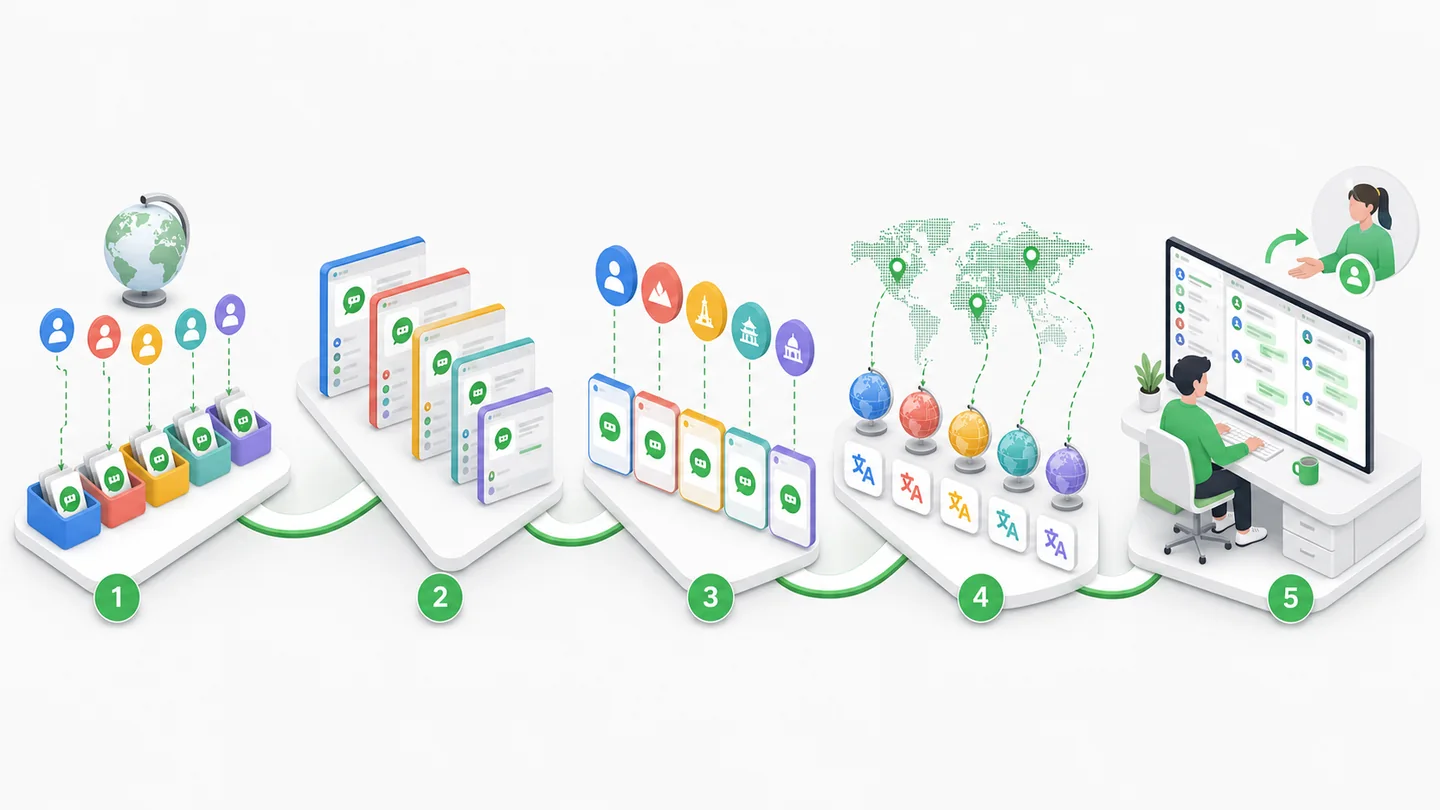
Transhub connects account organization, persistent instances, market settings, multilingual conversations, and handovers in a repeatable operating workflow.
A Five-Step WhatsApp Multi-Account Workflow
Teams can begin with five practical rules instead of starting with complex technical settings.
- Sort accounts by market and purpose. Record the country, customer type, business line, and current owner of every number. Retire or review accounts with no clear purpose.
- Create a separate Transhub instance. Sign each WhatsApp account into its own persistent instance instead of repeatedly replacing the login in one browser session.
- Give every instance a recognizable name. Use a “market + function” or “product line + owner” convention so operators can confirm the account before replying.
- Configure language and proxy settings where needed. Keep suitable translation rules for different customers. Important regional accounts can use a stable, reasonable network exit when the operation requires it.
- Define reply and handover rules. Decide who handles unread messages, which customers take priority, how shifts record pending work, and who responds to an account issue.
Consider an exporter serving Latin America and Europe. The Brazil account handles Portuguese inquiries, the Mexico account serves Spanish-speaking buyers, and the European support account handles after-sales questions in English. All three can remain active in one Transhub workspace while their login sessions, proxy assignments, and translation settings stay attached to their respective instances.
Who Needs WhatsApp Multi-Account Management Most?
Foreign Trade SOHO Sellers and Cross-Border Freelancers
One person may maintain separate numbers for lead development, existing customers, suppliers, and after-sales support. A unified workspace reduces browser and translation-tool switching while preserving clear account roles.
Export Sales Teams
Larger exporters often organize WhatsApp business accounts by country, product line, or salesperson. Recognizable instance names and separate sessions help sales representatives identify high-value inquiries and avoid sending one market's quotation from another account.
International Customer Support Teams
Pre-sales, orders, logistics, and after-sales work may use different accounts. A centralized account entry point makes it easier for a shift worker to confirm the current service stage, while internal records remain necessary for tasks and handovers.
Cross-Border MCNs and Content Operations
Content teams may handle partnership and audience conversations through WhatsApp, Instagram, Messenger, and Telegram. Transhub can organize channel instances by market, while WhatsApp multi-account management remains the primary topic of this guide.
Why an Ordinary Browser Becomes Difficult at Scale
Browser profiles can provide a temporary multi-login workaround, but they do not organize accounts, proxies, customer languages, and communication tools as one system.
| Method | Accounts online | Session separation | Account-to-proxy relation | Message translation | Daily management |
|---|---|---|---|---|---|
| Repeated login in one browser | Inconvenient | Sessions get replaced | None | Separate tools | Easy to mix accounts |
| Multiple browsers or profiles | Possible | Partially separated | Remembered manually | Separate tools | Many similar windows |
| Transhub workspace | Independent instances | Stored by instance | Configurable per instance | Integrated translation | Central account entry points |
The hidden costs appear in daily details: finding the correct profile every morning, remembering which proxy and language belong to each account, missing customers among similar windows, copying messages into another translator, and struggling to understand a former employee's browser setup.
Why Independent Sessions and Proxies Still Matter
Opening several pages is not the same as separating account sessions. When cookies, cache, and login state are stored per instance, an action in one account does not directly replace another instance's session.
A proxy addresses a different layer: where network requests exit. Transhub lets channel instances select a proxy when required, creating an inspectable relationship among the account, market, and network configuration. This does not mean that every account must have a unique IP, and random country rotation is not an anti-ban strategy. Stable, explainable settings are generally easier to operate over time.
Transhub brings persistent instances, proxy assignment, regional settings, and multilingual customer communication into one desktop workflow where teams can continue to inspect the configuration.
Five Common Multi-Account Mistakes
Naming Every Account Only by Its Phone Number
A number does not explain market, purpose, or owner. Use a shared “market + function” naming convention and maintain an owner record.
Letting Several People Take Over an Account Without Rules
Uncoordinated access creates conflicting replies, abrupt environment changes, and unclear responsibility. Assign an owner to important accounts and define shift handovers.
Choosing Proxies from Memory Every Day
Manual selection can cause unnecessary country changes. Test the connection first and maintain a relatively stable assignment based on the market and value of the account.
Replying Without Confirming the Account and Market
Similar avatars and windows make it easy to send a quotation from the wrong account. Confirm the instance name, customer language, currency, and product line before sending.
Treating Multi-Account Software as a Bulk-Messaging Tool
Managing accounts together does not remove customer consent or platform requirements. Transhub focuses on customer communication, translation, and account environments rather than unauthorized bulk outreach.
A Checklist to Reduce Mix-Ups and Missed Customers
- Name every instance by market and purpose.
- Use distinguishable avatars, colors, or notes where available.
- Confirm the instance, customer language, and business line before replying.
- Assign a primary owner and backup for important accounts.
- Record proxy, region, and major environment changes.
- Establish priorities for unread conversations and valuable customers.
- Verify quotations, currencies, quantities, model numbers, and delivery dates manually.
- Avoid unnecessary sign-outs, device changes, and country changes.
Product and Compliance Boundaries
Transhub cannot guarantee that a WhatsApp account will never be restricted. Keeping several accounts online does not authorize unsolicited bulk messaging. Independent instances and proxy settings address operating environments and account organization; account safety still depends on customer consent, message quality, sending behavior, and team procedures. A restricted account cannot be restored automatically by creating a new instance or changing a proxy. Transhub is an independent product and is not affiliated with, authorized by, or sponsored by WhatsApp or Meta.
Frequently Asked Questions
Can one computer log in to multiple WhatsApp accounts?
Yes. Separate channel instances can manage several business accounts. Each account must still complete any login verification required by WhatsApp and follow the platform's terms.
How can several WhatsApp accounts stay online at the same time?
Create and sign in to a separate Transhub instance for every account. Each persistent instance keeps its own session, and operators can switch from the central workspace.
How many WhatsApp Web accounts can I open?
WhatsApp does not provide Transhub with a universal account-count promise. Practical capacity also depends on computer resources, channel state, and account verification, so Transhub does not market “unlimited accounts.”
Do the accounts share cookies and login state?
No. Persistent Transhub instances store cookies, cache, and site data separately instead of using one default browser session.
Do I need to scan a QR code every day?
Normally, persistent instances retain their login state. WhatsApp may still request authentication because of security verification, an expired session, or another service requirement.
Does every WhatsApp account need an independent proxy?
Not necessarily. Transhub allows proxy selection per instance but does not claim that “one account, one IP” is a fixed platform rule. Decide according to the account, market, and real network requirements.
Can several accounts share one proxy?
They can be configured according to operational needs. For important regional accounts, a clear, stable, inspectable network relationship is usually more useful than uncontrolled rotation.
Can Transhub translate messages from different accounts?
Yes. Transhub supports incoming and outgoing message translation, with voice-to-text, voice translation, and AI conversation summaries available for related cross-language workflows.
Does Transhub support channels other than WhatsApp?
Yes. Teams can also organize Instagram, Messenger, Telegram, and other supported cross-border communication instances by account and market.
Can multi-account management completely prevent bans?
No. Separate instances and stable environments reduce tool mixing and environment-management problems. Spam, complaints, fraud, and outreach without consent can still lead to restrictions.
Does Transhub support automatic bulk messaging?
Transhub is positioned as a multi-channel, multi-account communication and translation workspace, not as a tool for bypassing platform restrictions through automated bulk messaging.
Can Transhub recover a restricted WhatsApp account?
No. Use WhatsApp's review process and investigate complaints, message sources, and team operations. A new instance or proxy is not a replacement for review.
Turn Multiple Accounts into One Clear Customer Workspace
Multi-account management is not about opening more windows. It is about giving every account, market, customer, and owner a clear place. Transhub combines persistent login instances, account switching, proxy assignment, and real-time translation in one desktop workspace so sales and support teams spend more time on customers and less time rescanning codes, searching for windows, and copying messages.
Use Transhub to organize WhatsApp business accounts and cross-border customer conversations, so every account switch begins with a clear market, customer, and business purpose.