
The short answer: with Transhub, a team can select and bind a separate network proxy for every WhatsApp account or channel window. Existing Clash subscriptions can be imported directly. Teams can also paste a regular subscription, import a list of share links, or add a proxy manually instead of switching among browsers, proxy extensions, and accounts.
This is not about hiding an account. It creates a clear, maintainable relationship between an account, its market, and its network exit:
- Reduce mixed network environments. Each business account can use its own proxy configuration instead of following one system-wide connection.
- Reduce abrupt IP and country changes. The assignment stays with the channel instance, so operators do not need to choose a node from memory every day.
- Make team handovers clearer. Owners can see which account serves which market and whether its assigned exit is working.
- Unify account communication and translation. Sales and support teams handle inquiries, quotations, after-sales conversations, translation, and proxy management in one workspace.
An independent proxy can make an account environment more stable and easier to inspect. It cannot guarantee that a WhatsApp account will never be restricted, and it cannot offset spam, harassment, fraud, or outreach without consent.
How Transhub Assigns a Proxy to Each Channel Window
A system-wide proxy normally affects the entire computer. When that connection changes, every browser and account may change with it. Transhub brings proxy selection down to the channel-instance level: each business window keeps its own login session and can also keep its own network exit.
Bind a Proxy Directly to a Channel Instance
A Latin America sales account, a European support account, and an Asia operations account can each use a different proxy. The assignment is stored with the channel instance, so reopening the workspace does not require the operator to remember which node belongs to which account.
Transhub does not force every account to use a unique IP. WhatsApp has not published a universal one-account-per-IP rule. The practical benefit is control: important accounts can use stable, regionally appropriate exits, while a team defines a different policy for temporary or low-priority instances.
Import a Clash Subscription in One Step
Teams that already maintain a Clash subscription can paste its subscription link into Transhub. Recognized nodes are parsed and added to the proxy pool, avoiding repetitive entry of server addresses, ports, and credentials.
This feature imports a Clash subscription link; Clash is not described as a proxy protocol. Existing proxy resources remain useful, but they become organized around business accounts rather than a separate client configuration.
Import a Standard Subscription or Share-Link List
Running the Clash client is not required. Transhub can process Base64 subscription content and plaintext share-link lists. Parsed nodes enter one proxy list where a team can test, filter, and assign them.
This matters when an organization has dozens of regional nodes. An administrator can maintain the source and proxy pool while sales representatives avoid handling long node strings or an external spreadsheet that quickly becomes outdated.
Add Common Proxy Protocols Manually
Dedicated fixed proxies and nodes not included in a subscription can be entered manually. Transhub supports:
VMessVLESSShadowsocksSOCKSHTTPHTTPS
Subscriptions are efficient for building a pool; manual entry gives important accounts more precise control. Both methods can be used together.
Test Proxies and Review Exit Regions
Importing a node does not prove it is available. Transhub can test proxies and display connection status and exit region. Teams can confirm connectivity first and then select an exit that fits the account's market.
When a proxy fails, this information helps an operator address the network issue before repeatedly logging out, rescanning a QR code, or reinstalling a browser. Knowing whether a problem comes from the proxy or the channel is itself a meaningful operational advantage.
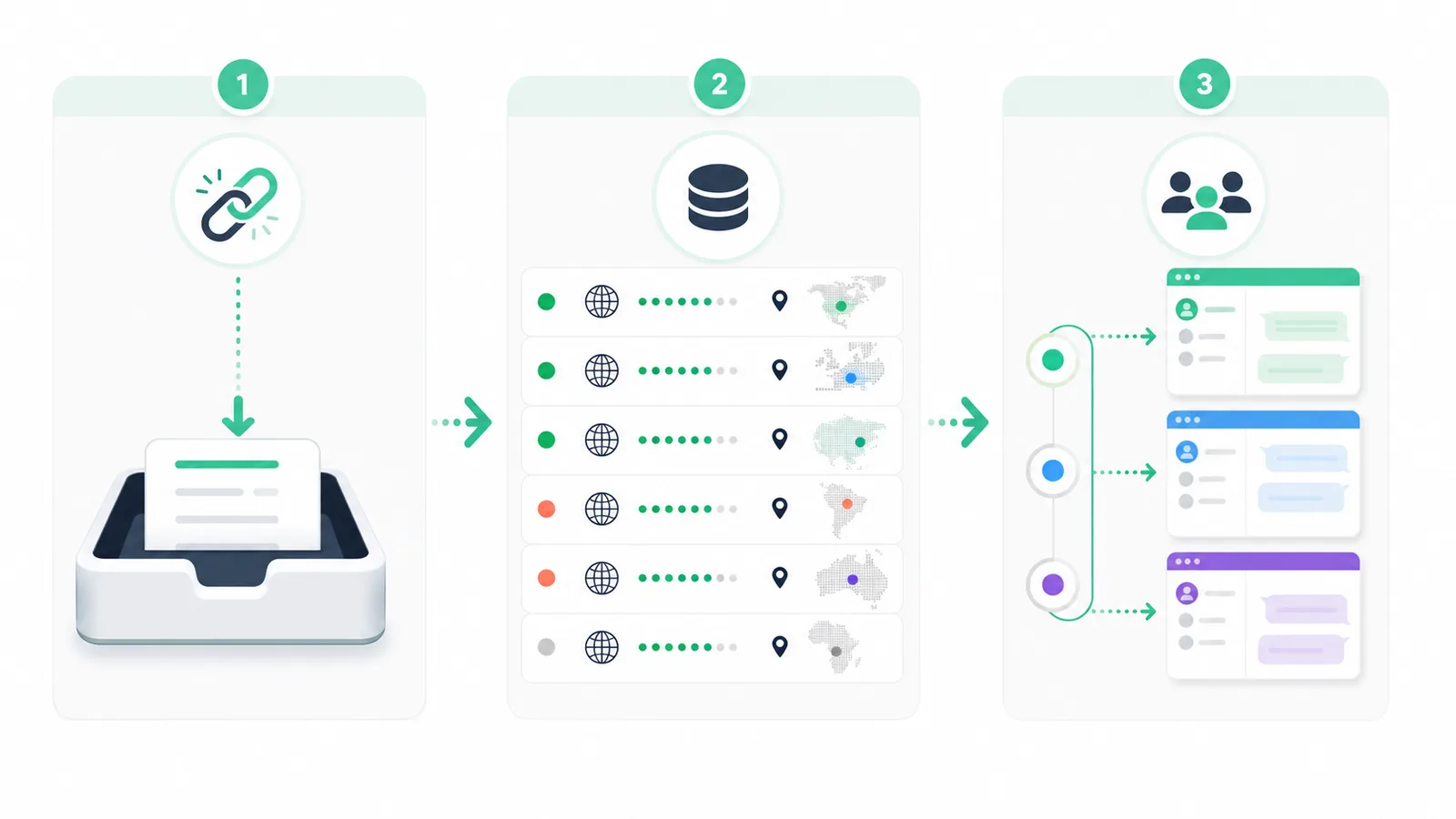
Transhub turns subscription import, node testing, and channel assignment into one manageable workflow instead of a collection of personal technical settings.
A Five-Step Independent Proxy Workflow for WhatsApp Accounts
- Create a separate channel instance for each business account. Name it by market, business unit, or owner.
- Import existing proxy resources. Paste a Clash subscription, standard subscription, or share-link list; add dedicated nodes manually when needed.
- Test nodes and confirm their exit regions. Do not bind an unavailable or geographically unsuitable node to an active account.
- Assign a stable node to the corresponding window. Match it to the target market and avoid country changes without a business reason.
- Document ownership and changes. Record the account market, proxy source, latest change, and incident reason.
For example, a Brazil sales account can keep a stable South American exit while a European support account uses a European node. Both remain available in the same workspace. The operator can handle Portuguese inquiries, English quotations, and support conversations without running separate browsers, proxy extensions, and translation websites.
With Transhub, login sessions, network exits, and customer conversations can live in one workspace. A proxy becomes an account-level team setting instead of a hidden personal browser preference.
What Else Does an Independent Proxy Improve?
Clearer Ownership Across Regional Teams
When account, market, owner, and exit are connected, a team can quickly answer who operates an account, which region it serves, and which network it uses. Shift changes no longer require copying an employee's entire browser setup.
Fewer Tools and Configuration Mistakes
Traditional setups often combine browser profiles, proxy extensions, test websites, and translation tools. Every account adds another setting that can be selected incorrectly. Transhub centralizes proxy pools, account windows, and message translation to reduce these avoidable mistakes.
Faster Network Troubleshooting
If messages stop loading, operators need to distinguish a proxy failure from a local network or channel issue. Centralized tests and exit information shorten that path and reduce unnecessary logout and QR-login cycles.
Better Continuity for Long Customer Relationships
Export inquiries rarely end in one chat. Quotations, samples, shipping, and after-sales support can continue for months. A relatively stable exit is easier to manage than choosing a random country each day.
One Multi-Channel Communication Workspace
WhatsApp multi-account management is the primary example, but independent proxy selection also applies to other configurable channel windows in Transhub. Teams can organize instances by market and business function while using incoming and outgoing translation, voice processing, and AI conversation summaries.
Why a Single Global Proxy Is Not Enough
| Management method | Proxy scope | Account mapping | Testing and region data | Main limitation |
|---|---|---|---|---|
| System-wide proxy | Entire computer | No clear mapping | Requires other tools | Every account changes together |
| Browser proxy extension | Browser or tab | Relies on memory | Varies by extension | Session and proxy stay separate |
| Transhub independent proxy | Each channel instance | Bound to the account | Centralized testing | Designed for ongoing multi-account work |
A proxy controls the network exit. An isolated session prevents accounts from directly sharing login data. For long-running business accounts, time zone, language, and location should also remain reasonably aligned with the selected region.
These elements solve different problems. Changing an IP does not isolate cookies, while opening another browser window does not change the network route. Transhub brings the instance, proxy assignment, and regional environment into one workflow that a team can inspect and maintain.
Practical Rules for Independent Proxies
- Use stable, trustworthy proxies for important accounts.
- Choose a region that matches the real customer and team workflow.
- Do not treat constant country rotation as a safety strategy.
- Reload the channel instance after changing its proxy.
- Test proxies regularly and address failures before continuing important work.
- Avoid unknown, heavily shared public proxies for accounts that hold valuable customer relationships.
- Record important proxy changes, owners, regions, and incident reasons.
- Continue to respect customer consent, sending limits, and opt-out requests.
Important Boundaries
An independent proxy cannot guarantee that a WhatsApp account will never be banned. WhatsApp has not published a fixed number of accounts allowed per IP. A proxy cannot protect spam, fraud, harassment, or unauthorized bulk outreach, and changing a proxy cannot replace the platform's review process. Long-term account stability depends on the network environment, customer consent, message quality, and responsible team operations together.
Frequently Asked Questions
Does every WhatsApp account need its own IP?
Not necessarily. WhatsApp has not published a one-account-per-IP requirement. Independent proxy assignment gives teams the ability to maintain a clear, stable network configuration for important accounts.
Can an independent proxy completely prevent a WhatsApp ban?
No. A proxy manages the network exit. Reports, spam, fraud, unsolicited messages, and abnormal operations can still result in restrictions.
Can Transhub import a Clash subscription directly?
Yes. Paste a Clash subscription link into the import area, then test and assign the recognized nodes from the proxy list.
Can I import a subscription without running Clash?
Yes. Transhub supports standard subscriptions as well as Base64 and plaintext share-link lists. The Clash client does not have to be running locally.
Which proxy protocols does Transhub support?
Transhub currently supports VMess, VLESS, Shadowsocks, SOCKS, HTTP, and HTTPS through subscription import or manual entry.
How do I know whether an imported proxy works?
Run a proxy test and review its connection status and exit region before assigning it to an active business account.
Is a fixed or rotating proxy better for a business account?
A relatively stable proxy is generally easier to manage for an important account with long-running customer relationships. Unstructured country rotation should not be treated as a ban-prevention method.
Why reload a channel after changing its proxy?
Some network and regional settings must take effect before the page loads. Reloading helps the new exit and channel environment update together.
Can several channel windows share one proxy?
Yes, if that matches the team's operating policy. Transhub provides independent choice per window; it does not force every window to use a different node.
Can changing a proxy recover a restricted WhatsApp account?
No. Restricted accounts must use the platform's review process. Teams should also investigate message sources, customer complaints, and operational practices.
Put Proxies, Accounts, and Customer Communication in One Workspace
The purpose of an independent proxy is not to hide an account. It gives every business account a clear, stable, inspectable network configuration. Transhub combines subscription import, node testing, instance assignment, multi-account communication, and real-time translation so cross-border teams can spend time on customers instead of repeatedly configuring browsers and proxy extensions.
Use Transhub to organize accounts, markets, and network exits around a sustainable sales and support workflow.